Latest
Showing posts with label HowTo. Show all posts

How to get alert when someone unfriend you on facebook


This is the simple add-on just follow these steps and have fun.


  • The initial thing to do is install the browser add-on named F.B. Purity  just CLICK HERE (link will open in a new tab or new window). This works with the thses web browsers: Firefox, Google Chrome, Safari, Opera and Maxthon. The installation will be different a little for each browser


  • When the add-on has been installed, visit Facebook. Secreen will open with a big “Welcome” note from your recently installed add-on. Click the “X” in the upper-right corner to close it.


  • There you will see that there’s a big FBP bar in your Facebook “menu bar” that wasn’t there earlier. Visit F.B. Purity Settings section. After you’re complete going through this lesson, take a look at those Settings. F.B. Purity doesn’t just save your Friends List, it has a slide of very helpful features (eliminate part you don’t want).


  • The earliest time you stopover Facebook once installing F.B. Purity it will generate a file of your Friends that’s stored on your computer hard. Every later time you visit Facebook it will robotically contrast that list to your present Friends List, and if there are any changes you’re prompted with a list of them.
Related: How to delete a Facebook page?

Reminder: if you unfriend somebody, or if someone leave Facebook, their name will also show in the listing. F.B. Purity determines who you’re not Friends with no longer it doesn’t distinguish between who did the Unfriending – it just displays the chang.

You as well observe a new Deleted Friends Alert item in your Facebook “sidebar”, which will be displayed each time when anyone “leaves your Friends List or unfriend you”.


How to Increase Facebook Page likes for business


Tip 1. Invite your Friends to like Page.

By inviting every friend to like your page you can also Increase Facebook Page likes for business. It will give likes in small but in real amount but by increasing friends it also increase. So trying to make best relation with your friends. It’s also a best way for get real likes for free. Increase your friends increase your page likes.

Tip 2. By likes Exchange website.

Likes exchange points and websites, I believe one of top way to increase real likes,  There are many likes exchange websites you can use, But addmefast is the best, Its very simple to use and you can also boost more point very in a moment. Immediately visit like exchange site and make a few points and give your site in my site section in that website, and done, They will provide you 50 points as bonus on sign up as well. Other one is like4like on second number after addmefast it’s also very simple to use.

Tip 3  Insert Like box to your website.

If you have a site with excellent traffic, then you can obtain more likes by adding a like box in side block, If you desire to change your visitor into your business page like then you must use Facebook popup like box, You know popup box will give you more likes for your page in a quick way, and these all are associated to your business or your business site topic or categories.

Tip 4  Create your Post and Page Unique

 As you familiar, now days generally people have more  this social networking site business, All are trying to get more likes on their private and business pages, So people are trying to stay away from these people, and people also trying to keep away from unwanted update on their wall, So you have to trying to share always unique and helpful posts for people.


Social networking site business trying to update their mark for make more trusted site for their users, Now this social networking site trying to remove fake on this social site, So it’s giving a choice to verify a Facebook page and people also more attract to verified, so you must try to verify your page so, people can trust you and page. visit facebook verify page.

How to remove ads from windows 10 startmenu


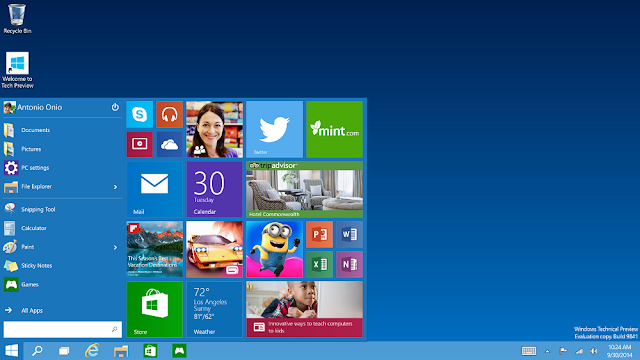
Your Start menu could include ads from microsoft which are not-so-helpful for users.

If you’re operating  Windows 10 with default settings, you  perhaps noticed apps creeping into the right hand (tile) side of your Start menu – apps you can not  place there. By Clicking on these “apps” opens up the Store, where you can buy and download them. Microsoft calls them “suggestions,” but they’re in reality just ads.

You understand actully microfost sending you ads directly on your start menu.
Here are is a qiuck way to get clear off these ads in just 1 mint


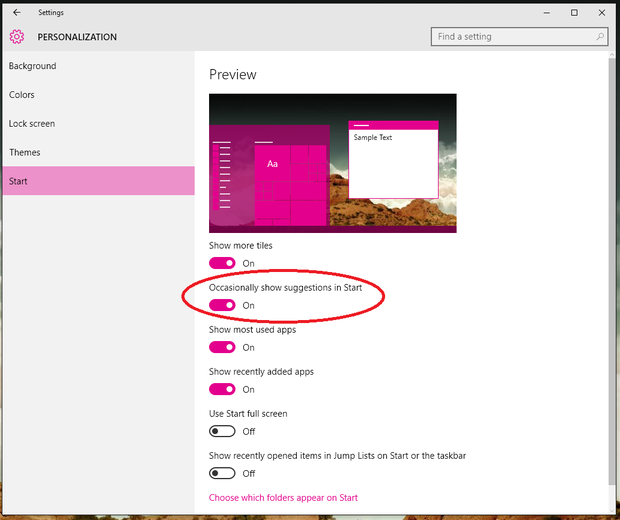
Go to the Settings and then search for  Personalization > Start. You wll notice a number of button, but the next one should state “Occasionally show suggestions in Start.” Turn this button to Off and shut the Settings menu.


Yes That’s all you have to do! No further your Start menu have no mare ads.

How to backup and store your what’s app massages


whatsApp
whatsApp

Last month, I have to finish Phone app from my iPhone port and put WhatsApp in its place. I don’t remember the last time I finished a phone call, but I perhaps launch WhatsApp close to a hundred times a day. There are dozens of WhatsApp groups forever screaming for notice — a grade school friends group, college classmates, family members, and more. In all, I have more than 84,000 messages and nearly 1,800 pictures in WhatsApp. That’s a fair large piece of data that would be gone forever if I ever lost my phone or dropped it in the toilet.

How to back up your what’s app?
On an iPhone, it’s really simple. WhatsApp uses iCloud to back up not just text messages but also all received and outgoing media like photos, videos, and voice messages.

Enjoy online Movies CLICK HERE 

To start a backup, tap the Settings button on the menu bar at the footer of WhatsApp. Head over to Chat Settings, and next tap Chat Backup. Here, you can manually start a backup by tapping the Back Up Now button. Or you can set WhatsApp to automatically back up your stuff daily, weekly, or monthly. WhatsApp will begin to back up automatically only if your phone is plugged in. But make sure you’re attached to a WiFi network, because it will happily start backing itself up over your data plan! Backups can be huge — hundreds of megabytes if you’re an energetic user.

How to backup what’s app massages if you cahnge your iphone?
If you change iPhones, you’ll be promoted to bring back WhatsApp from a backup the first time you install it. As long as you’re using the similar iCloud account, you should be capable to pick up right where you left off.


On an Android, stuff get a little more complex. If your phone has a microSD card, that’s what WhatsApp will back up to by default. To start a backup, open WhatsApp and strike the Menu button. Navigate to Settings → Chat Settings and then hit Backup Conversations. just go over the microSD card to your new phone to restore WhatsApp conversations.


If your Android phone doesn’t have a microSD card, set off through the same steps on top of. WhatsApp will back up to your phone’s interior memory at this path: /sdcard/WhatApp/. You will need to shift this folder from your old phone to the same folder on your new phone by copying it to a computer.

How to keep your computer safe from hackers with security software


internet protection sheild
internet protection

If you do not want to experience a hack just realize responsibility the right things is frequently sufficient to keep more than 98% of Windows PCs malware free, barring accidents. (Microsoft says that the in the fourth quarter of 2013, its software removed malware from 1.78% of PCs worldwide, with Tunisia having the worst infection rate at 4.95%.) on the other hand, accidents can happen to anyone….

Keep your pc  up to date
The huge majority of malware infections develop security holes that have already been set, so the most important part of PC hygiene is to keep all your software up to date. Microsoft releases patches on the second Tuesday of each month, so also let your PC install them automatically, or install them at the appointed time. Once a patch is released, malware programmers can reverse-engineer the attach to find the security hole and develop it.

several additional programs – contain the Firefox and Google Chrome browsers – will also install patches routinely. This is approximately all the time a good thought for home users.

Additional, I strongly advise to instal Secunia's Personal Software Inspector  to keep your computer safe from hackers with internet protection and security software. This checks all the software on your PC, tells you which programs require updating, and gives you a attain. It can install updates for you, and will tell you if a program wants to be updated manually. It will also tell you if any parts of Windows require to be updated, which at times happens when Microsoft's attempt to install an update fails.

When you install Personal Software Inspector, use Windows’ customise choice to show its icon in the System Tray notification area on the right hand side of the task bar. Holding the mouse pointer over the icon will tell you what you need to know. Otherwise, attempt to get into a schedule of checking Personal Software Inspector once a week.
 
 Anti-virus software for sfety
good Anti-virus software for security
A good Anti-virus software
Now  recommending and installing the free Avast 2014 anti-virus program, which includes anti-spyware and anti-rootkit shield. As with many free programs, it may come with not needed "foistware" (eg Google Chrome), so always use the custom installation option. Alternatives contain an old favourite, AVG Free, and Bitdefender Antivirus Free Edition. I note from a quick survey at PC Pro magazine that Avast is at present the most accepted option (19.8%) ahead of Microsoft's contributions (16.6%) and Kaspersky (16.2%), with AVG (8.8%) and Bitdefender (5%) straggling.


For business users and home users
For business users and home users who are ready to pay for a security suite, then I advise Kaspersky Pure 3.0 Total Security, which is now on sale at £34.99 for one PC for one year. Like the basic Kaspersky Anti-Virus 2014, this will try to roll back any malware activity. As well as a firewall, file shredder, safe money and anti-spam/phishing features, Total Security includes keyboard defense, banner ad blocking, a password administrator, encryption, backups and parental controls includes to keep save from hackers.as famous elsewhere, Malwarebytes Anti-Exploit software, which is intended to stop unidentified exploits before they install any malware. It's too quickly to know how useful it is, but it's free and doesn't look to have any harmful effects.

Checks, rescues and backups
No anti-malware software catches the whole thing, so it's vital to run a rapid double-check from time to time. The two programs Malwarebytes Anti-Malware (MBAM) and Kaspersky's Security Scan. A third choice is SurfRight's HitmanPro, which you can simply set up on a USB thumbdrive. It's a bad design to run two anti-virus programs at the same time, but these three are "on demand" scanners that you can run if you think your main AV program might have missed something.

The cause for putting HitmanPro with Kickstart on a USB memory stick is so that you can apply it to start your PC if it does happen to infected: it aims to fill before the virus. It's therefore an another Kaspersky's Rescue Disk 10. However, if your PC has an optical drive, you can begin it from a Kaspersky Rescue Disk created by downloading and flaming an iso file. If you only have one PC, it's a good plan to make a rescue or backup disk/USB drive in advance. You won't be capable to do it if you get locked out of your PC.

Make easy calls from mac


Now make calls from mac by connect app
Receive and Make calls from Mac

Now, Apple announced OS X Yosemite and a fit list of novel features set to create a debut in the upcoming release. But what Apple didn't say was that a lot of the features are in fact available in OS X right now, just not through Apple's own apps. That means you'll need to use a third-party app to gain some of the same functionality.

In case , you can previously place and receive phone calls on your Mac. And instead of restricting you to only your iPhone, you can also hook up an Android device to put and accept calls through you computer.

The app you'll require to make such a magic is called CONNECT.

After purchasing Connect, which will set you back $1.98, you will then require to go after the directions to pair your device to your Mac.

The app will live in your Mac's menu bar along the top of your screen to receive phone calls on your Macmac. When you need to put a call, click on the app icon, and then dial the number, look up your contacts, to put the call for you.

The call itself is transmit through your Mac's speakers, using the microphone ready on your Mac.
 Just go to mac app store and perchase CONNECT