Latest
Showing posts with label Laptops. Show all posts

How to remove ads from windows 10 startmenu


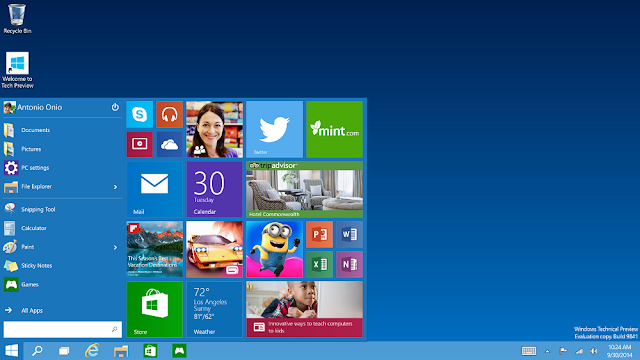
Your Start menu could include ads from microsoft which are not-so-helpful for users.

If you’re operating  Windows 10 with default settings, you  perhaps noticed apps creeping into the right hand (tile) side of your Start menu – apps you can not  place there. By Clicking on these “apps” opens up the Store, where you can buy and download them. Microsoft calls them “suggestions,” but they’re in reality just ads.

You understand actully microfost sending you ads directly on your start menu.
Here are is a qiuck way to get clear off these ads in just 1 mint


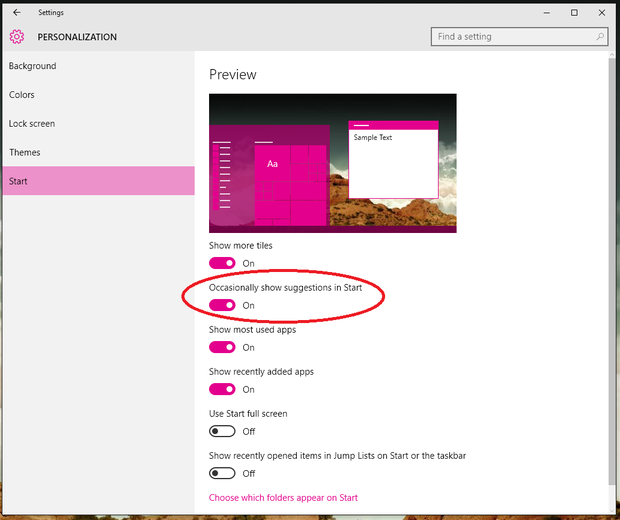
Go to the Settings and then search for  Personalization > Start. You wll notice a number of button, but the next one should state “Occasionally show suggestions in Start.” Turn this button to Off and shut the Settings menu.


Yes That’s all you have to do! No further your Start menu have no mare ads.

HP Split X 2 touchsecreen notebook plus tablet


new split x 2
HP split x 2

people aren't moving away from notebooks in support of tablets, but they are expect the influence of a notebook shouldn't approach at the cost of features just a tablet can offer. So the key is to unite together notebook and tablet in one. That’s the plan behind HP Split X 2, which equips the Split X 2 touch-screen the keyboard uses with a resolution of 1366 x 768 and all the functionality of a stand-alone tablet. But does that make troubles when using it as a notebook (or “laptop” if you prefer) or as a tablet? As was exposed, the answer was no.

Split by 2 feature:
At first look, the HP  Split X 2 seems to be a soundly designed notebook with a metallic feel that at once is discerned as being comfortable to carry from place to place. It’s heavier than those “air” type notebooks/net books, but it’s light to keep in mind that there’s a entirely performing  Windows 8 PC operating, with all the additions probable (like WiFi, Bluetooth, etc.). The complete sized keyboard’s keys have a rapid response and a good “bounce” to them: on the left side rim is a USB and headphones connection plus a SD card slot. On the right is the power switch, an HDMI output for Full HD video transmission and a fantastic speedy USB 3.0 input. I also wasn't amazed that there was no Ethernet connection, since WiFi can be used (however, a USB to Ethernet adapter can always be had). I’ll insert that speeding up on the keystrokes didn't reason the Split X 2 to start active also.

HP touch screen
The HP Split X 2 approximately begs to be opened up, with the axis putting the screen at a comfortable angle. The 13.3” screen hinges up with a safe heft and has, unlike with notebooks/net books, a micro-SD card slot, headphones, volume control and power button on its bottom border. These are pro use with the screen is detached and becomes a stand-alone tablet. And obviously, the screen is a touch-screen (power switch and volume control works when linked also). As a tablet, the screen has a fair sum of heft to it, but more highly its solid building can take the abuse of being attached/detached from the keyboard over time.I also exposed over time that WiFi is maintained even as the “screen” is removed from the keyboard to become a tablet. I’ll give HP a well finished for that

Split X 2 smart and light keyboard
Speaking of which, once a genuine difficulty with notebooks was that the link between the screen and keyboard body could be detached from the hinge’s continued use. Here, the screen/tablet connects through a connector on the keyboard’s body. Clicked in with a energetic “snap,” it’s secure. To eliminate, a tab is moved for the screen to be pulled out. That makes it pretty stiff to do wrong.

Split X 2 storage and usage:
while I first turned the Split X 2 on, I was amazed at how quick I could begin using it — that’s due to the solid state drive (128GBs). That’s not a vast sum of storage, but there is the capability to use memory cards as well as “Cloud” storage to take up the slack. one more surprise came at the volume and the quality of the sound I could get out of the built-in stereo speakers (that there was a stereo microphone as well wasn't predictable also). But insert to my surprise to find that the speakers were not only made by Beats, but where on the tablet. So that meant that the speakers worked whether I was using the Split X 2x in notebook or tablet mode. I also valued that charging while as a “notebook” takes care of powering the batteries in both the keyboard and “screen” together.

Split X 2  top permanence:
Windows 8 is built-in and is planned to job with both keyboard and touch-screens. With the keyboard attached, the response onscreen was very fast, no lag that I could see, yet when playing games being streamed above WiFi. Not that the HP Split X 2 was designed as a gaming machine, but for informal gaming that doesn't get intense hard-core, along with standard applications, there’s no complaints. Used as a tablet, touch-screen response was likewise fast and the direction sensor never got puzzled when rotating the tablet. For example, patter the Netflix tile brought it right up. Gaming on the tablet becomes immerse, since it’s easy to grip and make use of.
new detachable aplit x2
HP detachable aplit x2 

In general
 Weight in lbs                                                             4.9 lbs
 Hard Drive total internal                                           128GB
 Random access memory RAM:                                4GB
Screen Sized:                                                             13.3 inches
 Price now in available:                                             $1299


Best Samsung Chromebook 2 Review


best Chromebook 2 Samsung
Chromebook 2 Samsung

Chromebooks will not at all be for everyone, but assuming you're game, the 13-inch Samsung Chromebook 2 is the one we advise. Its sharp display, stylish design, long battery life and comfy keyboard make its value the premium over competing models.


Hardware Analysis.
Offered in gray only on the 13-inch model actually gives the device a premium feel. That's partially because of the similarity to real leather, but there's something else at work, also: The textured material does a good job masking fingerprints. Scratches, as well. still at the present that I've been using it a week, the machine still looks fresh. Not bad for a laptop that only costs $320.
Of course, your view might change one time you flip the machine over. Whereas the cover has been done up to look like a car seat, the bottom is made of plain gray plastic. Not that there's anything wrong with that; plenty of pricier PCs are made of this stuff. It's now that the pleather and plastic look mismatched, particularly since the base is more prone to picking up finger grease. Oh well. Not a big deal -- it's not like you have to look at the base that often, right?

Lift the lid and the Chromebook 2 looks like other recent Samsung laptops -- save for the Chrome OS hotkeys, of course.In-hand, the Chromebook 2 is regarding as weighty as a 13-inch Ultrabook, which is to say it weighs around three pounds (3.06, to be precise). As a bonus, it's noticeably thinner and lighter than the Toshiba CB30 Chromebook, one of the only other 13-inch Chrome OS devices obtainable right now. That guy comes in at 3.3 pounds and 0.8 inch thick, compared with 0.65 inch for Samsung's model.

Either version you catch the 11- or 13-incher -- the choice of ports will be the same. On board, there are two USB connections (one 3.0, the other 2.0), a full-sized HDMI socket, a headphone jack, a usual lock slot and a microSD reader to complement the industry-standard 16GB of storage. Like all Chromebooks, this one comes with 100GB of Google Drive space, so maybe local storage will be a doubtful point. That said, the microSD slot thing is a bit of a shame, because it means you can't put in the full-sized memory card you might be using in your standalone camera.

Display of Chromebook 2
I've got a few good news and shocking news. On one hand, the Samsung Chromebook 2 has a full HD, 1,920 x 1,080 display, making it sharper than the majority other Chrome OS devices .
The difficulty is that while the pixel count has better, the quality of the screen still has a ways to go. The LED panel doesn't make apply of any wide-angle viewing technology, which means you'll have to cheat with the screen position to get the white balance right. tip the display forward even a little and the colors will start to wash out, making on-screen text harder to read.

Display of Chromebook 2

Top performance and battery timing
It as well seems that by using an ARM-based mobile processor, Samsung was able to take out some genuine battery time gains. beneath perfect situation, the company promises 8.5 hours for the 13-inch model, and eight hours for the 11-incher. still with steady video playback and the brightness set to a moderately high 10 out of 16 bars, I still managed eight hours and 22 minutes of runtime. Not bad -- not bad for a Chromebook, and not bad for a equally priced Windows laptop, also.

Buying options
With the adding of the new Chromebook 2 line, Samsung at the present has three Chromebooks for sale: the new 11- and 13-inch models, beside with the last-gen model, which also has an 11-inch screen. All in all, the two Chromebook 2 models have additional in common than not. Both use the similar octa-core chip, 4GB of RAM, 16GB of built-in storage and the same port selection. Both have a leather-like back, though the 11-inch version is sold in black and white, whereas the 13-inch model is only presented in gray. The biggest dissimilarity aside from size -- is screen excellence: The 11-inch version has 1,366 x 768 resolution, while the bigger one goes up to 1,920 x 1,080. Accordingly, the 11-inch one starts at $320, while the 13-inch version retails for $400.


Chromebooks still aren't for everyone: There will forever be people who require stronger performance. Who want full offline access. Who want to install Skype. If that's you, no Chromebook will do, even if it is wrapped in fake leather

The best gaming laptop origin EON17-S


the best origin EON17-S
Gammers love this
Design
There are just a couple of names gamers need to know when in the marketplace for a 17-inch gaming laptop. Falcon Northwest, Asus, MSI, and Maingear all come to mind, but Origin PC is garnering chief attention with its EON line. The company is better known for construction made-to-order gaming PCs with fully assembled water-cooling blocks. But those who know the origin story will remember this gaming boutique was on track by ex-employees of the top-end gaming laptop maker, Alienware.
The EON17-S has some inspiring specs behind it that should convert to near desktop-level performance. However, given this machine's considerable footprint, it's more of a command deck than a laptop. Plus, its even larger price tag is proof enough that this isn't a purchase that gamers should take calmly.
Unlike the Alienware 17 or MSI GS70 Stealth, the EON17-S is a far more subtily-designed gaming laptop. When closed, the laptop only has a few bits of noticeable flair on its back lid, including a metal Origin logo and two flared lines. This makes the machine resemble a Lamborghini, thanks to the red rubberized lid.\

Enjoy online Movies CLICK HERE 

Specifications  origin EON17-S 
CPU:   2.8GHz Intel Core i7-4810MQ (quad-core, 6MB cache, up to 3.80GHz with Turbo Boost)
Graphics:  Nvidia GeForce GTX 880M (8GB GDDR5 RAM); Intel HD Graphics 4600
RAM:   8GB DDR3L (2 x 4GB at 1600MHz)
Screen:   17.3-inch, 1920 x 1080, LED backlit matte display
Storage:   2x 120GB mSATA SSD; 750GB HDD (7,200 rpm)
Optical drive:   8X Slim CD/DVD Burner (DVD+/-RW)
Ports: 3 x USB 3.0 ports (1 powered USB port, AC/DC), USB 2.0 port, eSATA (USB 3.0 combo), HDMI (with HDCP), headphone jack, microphone jack, S/PDIF output jack, line-in jack, RJ-45 LAN, mini IEEE 1394b port, mini DisplayPort
Connectivity: Intel PRO Wireless AC 7260; Bluetooth
Camera: 2 MP webcam
Weight: 8.5 pounds
Size: 16.2 x 10.9 x 1.8 inches (W x D x H)

Benchmarkings/standards  origin EON17-S 
3Dmarks : Ice Storm: 113,919; includs Cloud Gate: 19,109; Fire Strike: 5,444
Cinebench Graphics: 109.68 FPS, CPU : 684 cb
PCMark 8 Home: 3,283 points
PCMark 8 battery life: 2 hours, 46 minutes upto
Bioshock Infinite: (1080p, Ultra): 64.59 fps; (1080p, Low): 189.66 fps
Metro: Last Light: (1080p, Ultra): 18 fps; (1080p, Low): 42.33 fps Amazing


Additional  Amazing softwares.
CyberLink PowerDVD 14 Ultra: A necessary video playback application for any media on the EON17-S's storage banks or inserted during the optical drive.
Sound Blaster X-Fi: pinch your audio settings including master volume or change up the bass. moreover, you can turn on a mode to hear enemy footsteps from far-off, or modify your microphone input to sound like Christian Bale's Batman.
BioExcess: Here, you can record your fingerprint with the biometric scanner to lock up your Origin machine or launch a matching application.
Keyboard Color Picker: modify the keyboard with up to four part zones of color including the light up trackpad. Alternatively, you can click on preset modes, like the epileptic dance mode, or simply make the lights beat.

max performance origin EON17-S 
While the GTX 860M put up some top marks in our standard tests, the laptop truly shines when in reality playing games. Whether it was Grid Autosport, Titanfall, or the recent Battlefield Hardline beta, the EON17-S had no difficulty to keep the games above a strong 60 fps.